
This guide walks through how to use My Investment Hub, a centralized experience that allows investors with access to multiple Ark investor portals to seamlessly switch between them without signing in each time.
My Investment Hub is available at investors.arkpes.com and provides a single place to access all eligible investor portals.
Note: My Investment Hub is designed for investors with access to two or more investor portals on the Ark platform. If access is available to only one portal, this feature will not appear.
Jump to a Section
- What You'll Learn
- Who Can Use This Feature
- Step-by-Step: Accessing My Investment Hub
- Step-by-Step: Accessing Investor Portals
- Tips & Best Practices
- FAQ
- Next Steps
What You'll Learn
By the end of this guide, readers will be able to:
- Access multiple investor portals from one location
- Switch between investor portals without signing in again
- Navigate My Investment Hub
Who Can Use This Feature
This feature is available to:
- Investors (contacts) with access to two or more investor portals
This feature is not available to:
- Investors with access to only one portal
- Investors whose portal access is NEW or INACTIVE
- Admin users
Step-by-Step: Accessing My Investment Hub
There are two ways to access My Investment Hub.
Option 1: From an Investor Portal- Sign in to any eligible Ark investor portal.
- Select My Investment Hub from the navigation bar.
- The browser is redirected to investors.arkpes.com.
- Open a web browser.
- Navigate to investors.arkpes.com.
- Sign in if prompted.
After signing in, My Investment Hub opens automatically.
Step-by-Step: Accessing Investor Portals
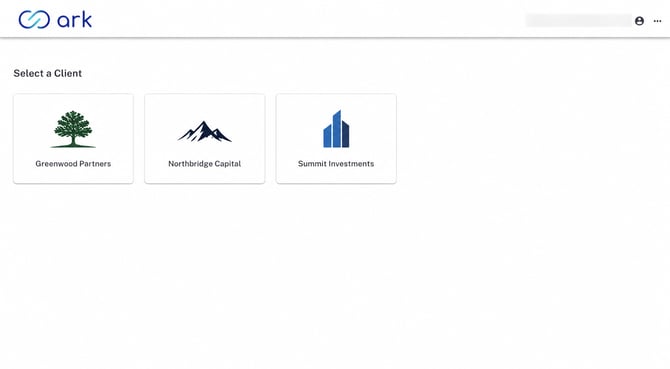
My Investment Hub displays every eligible investor portal associated with the current account.
Each portal displays:
- Portal name
- Logo (when available)
Only investor portals with an ACTIVE or PENDING relationship are displayed.
To open an investor portal:
- Select the desired investor portal to open.
- The selected investor portal opens automatically without requiring another sign-in.
Return to My Investment Hub at any time to switch to another investor portal.
Tips & Best Practices
- Bookmark investors.arkpes.com for quick access to all available investor portals.
- Use My Investment Hub when regularly accessing multiple investor portals.
- Only investor portals with an ACTIVE or PENDING relationship are displayed.
- If an expected portal is missing, contact the fund team or support@arkpes.com to verify access.
FAQ
Q: Why isn't My Investment Hub available?
A: My Investment Hub is available only to investors with ACTIVE or PENDING access to two or more investor portals. The feature is not available for admin users or impersonated sessions.
Q: Is another login required when switching portals?
A: No. After signing in once, My Investment Hub allows seamless navigation between available investor portals.
Q: Can My Investment Hub be accessed directly?
A: Yes. Navigate to investors.arkpes.com and sign in to access all eligible investor portals.
Q: Why doesn't My Investment Hub display every investor portal?
A: Only investor portals with an ACTIVE or PENDING relationship are displayed. Contact the fund team or support@arkpes.com if access is expected but not shown.
Next Steps
- Bookmark investors.arkpes.com for quick access to available investor portals.
- Use My Investment Hub to move between investor portals without signing in multiple times.
- Explore each investor portal to access documents, statements, capital activity, and other available resources.
If there are any questions, reach out to support@arkpes.com. We're here to help!