
The ark LP Portal is a fully branded investor experiences that gives limited partners a single destination to view their capital accounts, track capital calls and distributions, access fund documents and manage investor details - all powered by the same data as the fund's back office.
The portal is accessed through a unique URL provided by the fund team (e.g., https://<firmname>.arkpes.com).
Note: the LP portal is role-based. Each investor contact sees only the funds, investors, data, and documents their fund team has associated with their account. Two people at the same firm may see different selections based on their assigned roles.
Jump to Section
- What You Will Learn
- Who Can Use This Feature
- Getting Started: Signing In
- Capital Accounts
- Capital Calls and Distributions
- Documents
- Contacts
- Investors & Wire Information
- My Investment Hub
- Tips and Best Practices
- FAQ
- Next Steps
What You Will Learn
By the end of this guide, you will know how to:
- Sign into the LP Portal and navigate to it's key sections
- Understand what you can see based on your assigned roles
- View and download capital account statements and performance data
- Access capital call and distribution notices
- Find and download fund documents
- Manage your contact information
- Update investor wire details (Primary contacts)
- Access multiple investor portals via My Investment Hub
Who Can Use This Feature
This feature is available to Investor Contacts with an active LP portal login provided by their fund team.
This feature is not available to contacts whose portal access is Inactive or Admin / Back office users. Admin users access the portal through the admin portal.
Getting Started: Signing In
Your fund team provides a unique portal url in the format https://<firmname>.arkpes.com. You should receive a welcome email to set your credentials in order to sign in to the portal.
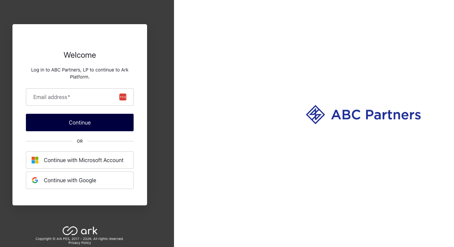
If you forgot your password:
- Navigate to the portal URL
- Enter your email address, and click "Continue"
- Select "Reset Password" below the sign in form
- Enter your email address then "Continue," follow the instructions sent to your inbox
Once signed in, you land on the Capital Accounts dashboard. Use the left-hand navigation bar to move between sections. Select the double-arrow (>>) to collapse or expand the navigation bar.
Capital Accounts
The Capital Accounts page is the portal's main dashboard. It displays a view of committed capital, funded and unfunded amounts, distributions, across all your fund relationships. Clicking on any blue dollar figure will allow you to drill through to the underlying transactions.
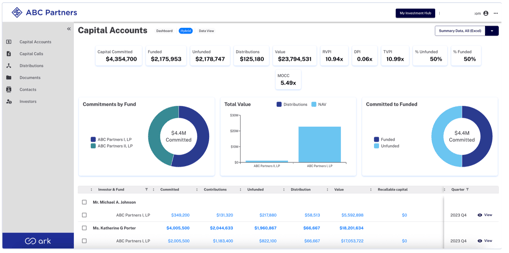
Step by Step: Downloading a Capital Account Statement
- Filter to the desired investor, fund, and quarter
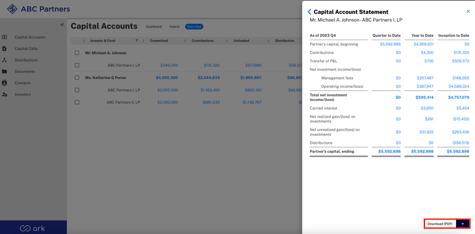
- Select "View" on the relevant row to open the capital account statement
- Select "Download PDF" or the dropdown arrow for Excel to save the statement to your device.
Capital Calls and Distributions
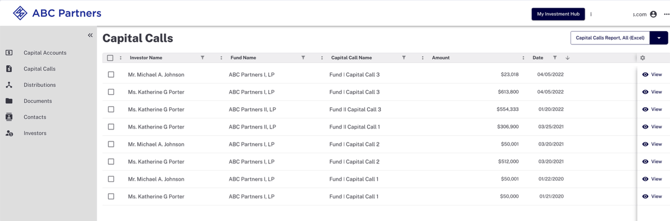
The Capital Calls and Distributions pages show a running list of all capital call and distribution transactions across your fund relationships with the associated notice document attached to each one. From these pages you can view individual notices, or download in bulk.
Documents
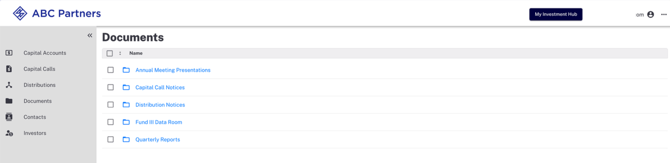
The documents page is a role-based repository available for all fund materials. The folders visible to you depend on the roles the fund team has assigned to your contact - you will only see folders tied to roles you hold. Capital Call and Distribution notices are published here by the system. Other materials - quarterly reports, K-1s, data room files, etc - are uploaded directly by the fund team. You can navigate the folder structure, and open documents within the portal, or download documents to your device.
Contacts
The contacts page shows all people associated with the same investors you have access to. You can use the search bar, or filters to find a specific contact.
Contacts with the Primary Contact role can edit information on this page, any edited information will be pending approval from the fund team. A contact with the Primary Contact role can also add new contacts to investors they have permissions for.
Investors
The investors page lists all investor entities you are associated. Additional details are available in this view, select the gear icon to customize which columns appear in the list.
Primary Contact users are able to view and edit additional details for investors, such as TIN/SSN and wire information. When a primary contact user makes these updates, the team receives an alert for review and approval before it goes live and is visible on the LP portal.
My Investment Hub
My Investment Hub is available to investors who have access to two or more Ark investor portals that utilize the same email address. It provides a single sign-on experience so you can switch between portals without signing in again.
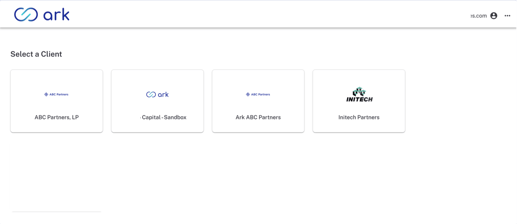
My Investment Hub is accessible at investors.arkpes.com, or via the My Investment Hub link in any eligible portal's navigation bar. Note - this is designed for contacts with access to two or more investor portals on the Ark platform. If you only have access to one portal, this feature will not appear.
For additional information on this feature, you can visit the detailed guide.
Tips and Best Practices
- Bookmark your portal URL for quick access
- Use the filter buttons on Capital Accounts, Capital Calls, and Distributions to narrow down specific funds or time periods
- Filtering by quarter on the Capital Accounts page gives access to historical PCAP statements
- Only folders ties to your assigned roles are visible on the Documents page - if you expect to see a folder that is not there, contact the fund team.
- All contact and investor edits go through fund team approval before they take effect. Allow time for review.
FAQ
-
Why can't I see certain sections (e.g. Capital Calls or Distributions)?
The portal is role-based. If a section does not appear in your navigation, your contact record may not have the corresponding role assigned. Contact the fund team to request acces. -
I made a change to my contact info or wire details - why hasn't it updated yet?
All updates go through fund team approval before they go live. The change will remain PENDING until the fund team reviews and approves it. - What is a Primary Contact?
A primary contact is a separate designation that grants write-access: adding or editing contacts, managing investor permissions, and updating wire information. This designation is assigned by the fund team.
Next Steps
-
Bookmark your portal URL for quick access
-
Review the Capital Accounts dashboard to see a summary of your investoments
-
Check the Documents page for the latest fund materials available to you.
- If you are a Primary Contact, review the Contacts and Investors pages to ensure all contact and investor information is current.